Where’s the data?

On my quest to learn this week I had the privilege to attend Peter Mackenzie’s Certified Wireless Analysis Professional class. When a colleague and I attended Peter’s CWNA class a couple of years ago he suggested that CWAP should the be next port of call after passing the CWNA exam. Initially I thought that was mainly because he wrote the book (and an excellent book it is too) but actually CWAP goes deeper into the protocol and builds an even better foundation for an understanding of how WiFi works.

Most people who’ve dabbled in networking are familiar with Wireshark. It’s a fantastic tool, and a great way of troubleshooting problems. With packet capture you can prove that client isn’t getting an IP address because it isn’t doing DHCP properly if at all, rather than it being a wider network issue…

Wired packet capture is usually easy. Mirror a port on a switch, put an actual honest to goodness old school hub in line (if you have one and can tolerate the lower bandwidth during capture), or if you have the resources get a fancy tap or dedicated capture device such as the Fluke Onetouch. Usually we have one of these methods available but for Wi-Fi it’s not quite so easy.

Mac users have these fantastic tools available, and there are good options for Linux users but for Windows folk life can be tough and expensive.

Wi-Fi drivers for Windows tend not to expose the necessary level of control to applications. So you’re left needing a wireless NIC with a specific chipset for which there’s a magic driver, or getting hold of an expensive dedicated capture NIC.

There is one option that I’ve played with in the form of Tarlogic’s Acrylic WiFi. This affordable software includes a ndis driver that interfaces with the Wi-Fi NIC and presents monitor mode data to applications. Analysis within Acrylic is fairly poor but it will save pcap files and it’s possible to use the Acrylic driver directly in Wireshark.

The problem is that many new drivers don’t interface with ndis in Windows as things used to so as a result there’s a shrinking number of available Wi-Fi NICs that still work.

Some time ago I bought an Asus AC53 USB NIC which is on the Acrylic supported list and it is possible to install the old windows8.1 drivers on windows 10. However this doesn’t support DFS channels, which is a problem because we use DFS channels.

Fear not though it is, just about, possible to make this work. The Netgear A6200 uses the same Broadcom chipset and supports DFS channels. Once installed I was able to select the netgear driver for the Asus device and sure enough it works.

Which is a long lead in to this little tidbit, a key take away from Peter’s course this week.

When looking at a wireless capture it’s important to remember you might not be seeing all the information. Physical headers are stripped off by the hardware of the Wi-Fi interface, so you can’t see those. Wi-Fi does certain things with physical headers only, such as Mu-Mimo channel sounding and aspects of this are therefore not visible to a protocol analyser.

It probably goes without saying that you can’t see encrypted data, but you can usually see that it’s been transmitted… Unless your wireless interface can’t decode it.

Let’s say, for example, your AP is using a 40MHz DFS channel and the capture setup you’re using can’t be configured to use 40MHz channels. In this scenario, because management and action frames are all transmitted on the primary 20MHz channel you can see these just fine, yet all the higher rate data frames that take advantage of the full 40MHz just disappear.
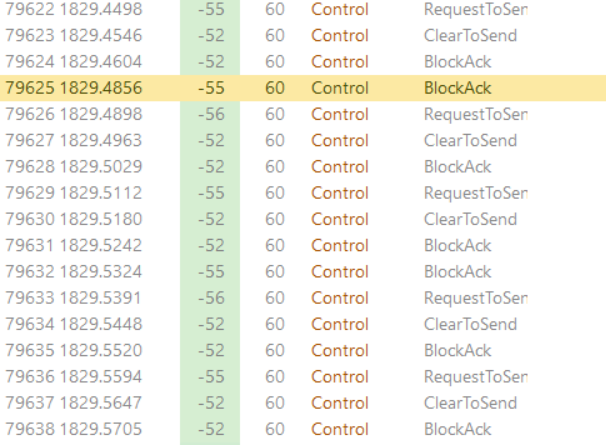
The result looks a bit like the picture here… A client sends RTS, the AP responds CTS and the next thing is a block acknowledgement but no data.

It’s sometimes possible to see the data transfer betrayed in the time between the packets but here, because the data rate is high and the traffic is light, it’s not particularly apparent.

I’m particularly looking forward to spending more time digging into protocol analysis and hopefully getting some better tools.

2.4GHz Channels and a four channel plan

EDIT – The conclusions of this article no longer apply to most environments as Bluetooth beacons have been arranged to avoid channels 1, 6 & 11 but will cause problematic interference with other 2.4GHz channels discussed here.

Many people say 2.4GHz is dead and whilst I view it as ‘best effort’ it isn’t going away and needs to be supported so I want it to be the best it can be. I use a four channel plan on our campus and my colleagues were recently informed this should never be done which inspired this post to explain the decision. This is quite lengthy but hopefully understandable. All comments and criticism welcome.

Continue reading

Wifi Design Cycle

I’m in the process of carrying out wifi improvement works on the campus, so I thought I’d write some pieces about our wifi equipment lifecycle and the processes I’m following.

Initial Survey
Pretty much everywhere has some wifi coverage. I’m therefore starting with an initial survey to find out what we currently have and inform what we need to change. Even if I know the coverage is terrible and I need to just start again, this survey is necessary to provide before and after documentation. It also shows how RF propagates through the building, which can help identify troublesome areas of attenuation that don’t show up on the plan. I try to identify where the available data points are at this stage, though it can be hard to be thorough about this.

Design
The design stage is predictive, though it’s sense checked using the initial survey information.

Deploy
Once there’s a new design, this gets deployed – this can be where some compromises occur as it turns out that ceiling cavity contains asbestos, or one of these data cables is damaged. Deployment is sometimes going to be done by me, sometimes by a contractor.

Validate
A repeat of the initial survey – validate the coverage is as expected, that APs are using sensible channels and we don’t have a Co-Channel Interference disaster, that 2.4GHz radios are on a sensible power setting or disabled as is appropriate. At this point there’s a loop back to design in the flowchart. If things are not looking as expected it’s back to the drawing board to find a remedy, then deploy physical or config changes and survey the area again. Recently I’ve carried out validation surveys in areas where I know an install compromise was made because the building structure wasn’t quite as expected. It was strangely satisfying to discover the original design was sound and the new AP position wasn’t working, so I had to come up with a different option.

Monitor
This is an ongoing process, but it’s worth confirming the throughput for group of APs is in the expected range (hasn’t dropped horribly for a building) and retransmissions are at acceptable levels. We use Aruba Airwave which makes it easy to group APs into an area for graphing of basic metrics. When wifi is improved in a building we expect to see an increase in client count and throughput but that isn’t always the case. Improving coverage in a lab means tablets can be used for note taking; that might be one or two more devices, not something that’s going to impact the graph.

I also talk to the users. Let them know there’s been a change, if they don’t already know. Ask for feedback and encourage them to tell you if there’s an device they need to use that doesn’t work so well in some parts of the building. Hopefully the design and validation accounts for this, but…..  I’ll more to day about that in another post.

CWNA – Achievement unlocked

Just over a week ago I completed my journey towards becoming a Certified Wireless Network Administrator… well, as much as anyone completes any journey in IT, there’s always more to learn.

When I started working in my current job and it became clear nobody understood WiFi, or knew how to solve the problems we were having, I quickly found the CWNP website and the numerous references to CWNA. A year later I was on a CWNA course with Peter Mackenzie. Probably the best aspect of the course was not how much I learned but how much it cemented what I’d already picked up through reading and lab work.

Like most certifications getting a good score in the CWNA exam requires you to learn and remember stuff that in reality you’d look up. In the end I found the exam straight forward. I felt I knew pretty much all the answers (actually it turns out I didn’t know at least three of them), but this is not because it’s an easy exam. I’ve spent a lot of time reading the study guides, making sure I knew what was expected… and then, because I dithered so much between taking the course and sitting the exam CWNA-106 was retired…. so I started again with a new study guide. I was pleased with the end result, a score of 95%. Worth all that work.

I’d like to pursue more certifications, otherwise I’ll need to find something else to do with my evenings. Because I work almost exclusively with Aruba equipment at the moment, it makes sense to look at the ACMA and ACMP certs. I’m also going to go further with the CWNP certs, probably looking at the Analysis Professional next.

The fact CWNP is vendor neutral is particularly appealing. Whilst it’s great to have a certification in Cisco or Aruba wlan equipment (the only two I’d consider worthwhile), these can focus on platform specific commands, licensing requirements and model lineup. Whilst this is useful information it doesn’t teach you about WiFi. I much prefer the approach of understanding how a technology works, something I can apply to any platform, rather than being restricted to knowing how to do things with a particular vendor’s equipment.

Fundamentally, whilst all WiFi network vendors have their pros and cons, their specific technology solutions to problems, RF is RF and if you understand how 802.11 it helps enormously to make sense of why a vendor does something a certain way.